Wednesday, 3 July 2013

Online Screening

Online Screening

For my online screening I gathered a selection of people together to view the advert online through the use of Blogger. This was interesting to do as I gathered information about how I could have improved the advert and what I needed to do to achieve this. Along with the improvements I also got back feedback of what went well within the animation and what the audience liked. 

WWW: The things that was said that went well throughout the advert was the story, sound, and mediums used. The story of the advert and the message that I was aiming to get across to the audience was done well as the majority of the audience commented on how the story was understandable and clear. With hearing this information I am pleased that this was the main thing that the audience noticed due to a charity advert having a message within the story. 

The online viewers also had comments to say about the use of foley and choice in soundtrack within the animation. They thought that the sounds suited the image on screen and synchronized well with these visuals. The foley within the animation is probably the part I am most proud of due to the fact that I feel it makes it that more realistic. To show this to the online audience I played the advert through with no audio and the response I received was that most of the audience got bored of the animation or that it didn't have that much more of a story. 

Another element that they commented on was that the medium I had chosen to use. This was the fact of the audience and my target audience enjoying that type of animation and having an interest in this style, claymation. 

Although the animation had some things that the viewers thought went well the was however some things that they did not enjoy and could have been improved. 

EBI: There was animation in the feedback about the speed of the animation, the distance and the models themselves in one scene. The speed of the animation was a bit too fast paced throughout and was slightly hard to keep up with. A way I could have avoided this comment was by spending more time and taking more images with moving the models less in each shot. 

The second thin in the improvements that I gathered was about the distance in the animation. The audience felt that the advert was too far away so it would have had less of an affect on the target audience. This takes away the feeling that the advert is personalized to an audience. 

The final improvement was due to a scene where there is a close up of the dog as it is eating some scraps off of a chicken bone. To achieve this i had to make a larger scale model of the dog's head and a larger chicken bone. The replica of the head had used the same colours of the original dog however it did not completely resemble the dog. However, this close up makes the dog look more of a "savage" which gets across the message that the dog in the first half is a stray, unhealthy dog. 

Tuesday, 2 July 2013

Team Meeting Minutes

Team Meeting Minutes

Team meeting 1: 8th April 2013
In this meeting we sat and looked over the storyboard. By looking at this we came up with ways to make the animation itself relate closely to the story. We thought about how we could make the characters look believable through the image and movement. After discussing the pros and con's of each medium we found that claymation would be the best option for our type of advert. The reasons for this being that we were able to create any props we needed from scratch and give the characters individual details to make the animation more realistic and hard hitting on the audience, along with the claymation being the smoothest moving animations from our tests before. 

Team meeting 2: 12th April 2013
In this session we talked about making the models move and giving them "life". To make it look like the man is walking into the shot and is not just jumping closer and closer to the screen we talked about how we could achieve it looking real. We looked at the leg and how a person would move each section differently to create the one movement. By looking at and following this we were able to form an animation that looked realistic and believable to the audience. 

Team meeting 3: 16th April 2013
The final meeting involved us looking at the animation and discussing what sound we was going to add. We already had the idea of using all natural sounds but we was still troubled on which to use. After sampling a few we were able to come to an agreement on which ones fitted best and which ones would go well and synchronize with the video. 

Animation Timline

Animation Timeline

The Magic Lantern - 17th Century 
The magic lantern was an early form of projector that is made from a con-caved mirror inside. When light passes through this it reaches the aperture and thus projecting an enlarged image onto a surface like a wall. The image that is produced is from a reflected image seen by the mirror made from the light. 

Thaumatrope - 1824
The thaumatrope was an invention which was mainly used as a toy in Victoria England. With an image on one side of a circle cut out and another on the opposite the images would be separated by a piece of string. The string would then be spun by a person and when fast enough the two images would look like one. An example of this is if there was an image of an empty cage and then a bird on the other side when spun fast enough the thaumatrope would then give the illusion of the bird inside the cage. 

Phenakistoscope - 1841
Planned in 1839 and invented in 1841 by a man named Plateau, the phenakistoscope is made from a spinning disc connected vertically to a handle. Around the edges of this disc would be a selection of images that are similar showing each shot of the animation. Next to these images would be a slit where the user would look through whilst the disc is spinning and see the illusion of the animation in the reflection of a mirror on the other side.

Zoetrope - 1833
The original zoetrope was invented by a Chinese inventor called Ting Haun in 180 AD. This was the earliest style of zoetrope found and was originally called Chao Hua Chich Kuan, which translates into 'The pipe that makes fantasies appear'. This was hung over a lamp to which rising air would cause the vanes to move at the top, and along with translucent paper when spun at the right speed, pictures painted on the panels would appear to move. The modern zoetrope however was invented in 1833 by a British mathematician William G. Horner. This was much like the phenakistoscope but the images were drawn on a strip of card that would sit on a third of the way in a metal drum. the slit's being above the images on the top half of the metal drum the was placed on top of a spindle and spun. when looked through the user could see the images and with a faster spin of the spindle the smoother the animation was.


Flip Book - 1868 
A flip book, originally called the kineograph meaning moving picture, was designed by John B Linnett consisted of many pages all having a similar image on. This book was then quickly flipped through and the images would cause an illusion of the images moving. This is because of the brain seeing multiple images instantly one after another causing the images to merge and make you think that it is once sequence from start to finish.

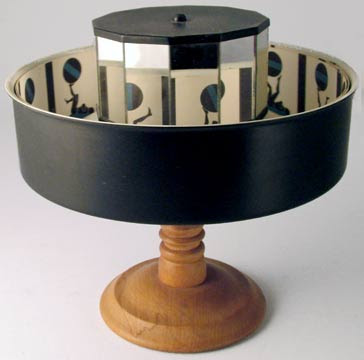
Praxinoscope - 1877
This was an devise that was the successor to the zoetrope. With a French inventor the praxinoscope was better than the zoetrope by replacing the slit's with an inner mirror. When the praxinoscope is spun fast enough the images are reflected in the mirror and is shown to the user as an animation. By doing this it made the image brighter and less distorted than previous.


Kinetoscope - 1888
This was an important part in film as it was an early motion picture exhibition device. This was done by not projecting the image but by the user looking through a peep hole and seeing a large amounts of images in a sequence to make a film. The kinetoscope would then be further developed by Thomas Edison in 1895 by adding the kinetophone to record and replay sound. This then became the basis for all film projectors.

Cinematograph - 1892
This, invented by Léon Bouly but licensed by the Lumiére brothers, this was a device the not only filmed but also projected the captured image onto a wall. This was later considered to some as the birth of cinema and a device that "replaced" pre-cinema.


Fantasmagoria - 1908 
The french animation, Fantasmagoria, by Emile Cohl was created by drawing each frame off the film on an individual piece of paper and then filming each frame onto a negative frame. This gave the impression that the film had a blackboard look to it. The film was made up of 700 drawings, to which each of them was double-exposed leading to a running time of just under two minutes. 

Felix the Cat - 1925
Felix the cat is an animated character made during the silent film era. With his black body, white eyes, and giant grin, fused with the surrealist situations that the cartoon places himself in, Felix the Cat was made out to become one of the most recognizable characters in animation history. Felix was the first character from animation to attain a level of popularity sufficient to draw movie audiences in, which later came to a low where Disney had the arrival of sound in their animated shorts. 

Steamboat Willie - 1928
Steamboat Willie was an animated short starring Mickey Mouse produced by Walt Disney. It was the first animation to have synchronized sound and although was the third film made with the character Mickey Mouse, it is classed as his debut as it was the first animation involving him to be put into some form of production. 

Momotaro's God-Blessed Sea Warriors - 1945
Directed by Mitsuyo Seo, Momotaro: Umi no Shinpei was the first ever animation from japan. Originally a propaganda film created by the Japanese Navel Ministry for the second world war, the film was lost for many years up until 1983 where a negative copy was found in Shochiku's Ofuna Warehouse. The film was re-released in 1984 and lead onto the birth of a new technique of animation called anime, with hit films like Spirited Away and Summer Wars. 

The Beatles Yellow Submarine - 1968 
The Beatles Yellow Submarine is an important part of animation as an animation originally had the intent of being aimed at an older audience. With animations being produced over time the target audience had become more specified to a younger audience and mainly for children. With the film Yellow Submarine used to capture the creativity and fantasy of the music and story of the Beatles Yellow Submarine and Sgt. Peppers Lonely Hearts Club, this brought back a film that an older audience could enjoy too. this would be the start of many adult animations like South Park, Family Guy, and Haunted World of El Superbeasto. 

Pixar - 1979
In 1979 the animator John Lasseter formed a company that specialized with a new type of animation. This was known as 3D animation which was the start of a new style in which this company was then funded by the Apple Inc. company on 1986. This started to put films in production and by 1995 Pixar had finally made their first film, Toy Story. The company led onto twelve other film and counting with other companies like Dreamworks following the same animated style. 

Visual Effect Editing Guide

Visual Effects Editing Guide

If you are making an animation and you wanted something to hover or to look like it is in mid air there are ways using the software Photoshop to make this happen. This is done over a process of five steps. These include the equipment, the set up, getting your footage, editing the film and then finally, using Photoshop.
The first step is to make sure that you have all the equipment needed for your animation. This will include your characters that you are using, the set where you are going to film, a digital still camera, and  a stand or some string and a clamp. The string and clamp or the stand will be how you get the object to be in mid air. Once all of this has been collected then it is onto the next step. 

The second step to this is to set up the equipment. Once the set is ready and you have placed the camera in a sensible position to view what you want to capture you would need to place the character or object where you want floating either on a stand or tied to a piece of string which is elevated by the clamp. Although the character is suspended in mid air, it is still clear how it is done and does not give the impression of floating. This will be the last step we do which fixes it. 

After the set up you will need to start taking the photo's for your footage in your animation. This would be done by taking images using a still image camera in a sequence and remembering to move the characters slightly each time. This would give the illusion that the, assumable, Lego man is moving. once this is done and you have your sequence you would need to upload your footage onto a computer and start the editing process. 

Once the footage has been uploaded via either SD card, or USB cable, you can edit the footage as you feel fit's. The footage that is uploaded into the editing software Final Cut is then editable to become shorter, longer, a change in colour, or adding video effects. Creating your story and adding audio is the main thing here, as you can add sound affects and dialogue to the animation. Once your story is ready then you can move to the final finishing touches and patch up them errors  using Photoshop. 
With every image used where the character or object is seen on a stand or tied to a clamp you should open it up within Photoshop so you can start to make it look like what you want to achieve. using the colour selector you can choose the right colours of the Lego man and paint over the string hiding it from all shot's. Once all images are edited your animation would look like the character/object is floating and would give this illusion to your audience. 


Questionnaire Analysis

Questionnaire Analysis 

From my survey that I have sent out to a range of people I have gathered back information that will help me create my charity animation. These include the age, gender preferences in music for the animation, the style in animation they would like to see and what they would like to see within an advert for the charity Dog's Trust. Also by doing this survey I have found a target audience that I can work my advert around and market to.

The results that I have collected show me that my main target audience would be people aged 16-20. It also tells me that over half of the people who filled out the survey are students and from this information here I can assume that the majority of my audience would be teenagers. I have assumed this due to the fact that if they are 16-20 and are students the are most likely still in a full time education therefore being a teenager. I would have to make my advert fitting to this audience and from the information that is given to me through my survey i can fit the genre and story around what the interest of the teenage audience are.

The main answer I got from the question 'What do you think will go well within an advert for the dog's charity Dog's Trust?' was about playing a guilt card. The suggestions were about showing images of "a dog both happy and sad" which play's with the audiences emotion. I will incorporate it within my advert by showing a dog in need and then show the transition on how the charity helps the dog for a better life. This would be good as it will show the audience what can happen when people help and will personalize the advert to that person who is watching. This way reaching out to them and getting out the message of what Dog's Trust is about.

Around 73% of the people who took the survey were male out numbering the female by a large amount. I have taken this into consideration and have thought on how I could reach that missing female target audience. How I would do this is by not gender specifying the advert. And along with the medium I have chosen out of the two that the target audience are wanting to see the most, claymation, the advert will suit an audience of both genders.

As for the soundtrack the target audiences reply was for a transition in music. Going from slow dark music to a more up beat cheerful sound. The reasoning be hind this is to go with the idea of the transition of helping the dog in need. There was also replies about natural sounds which I feel that I may incorporate into the advert to show it in a more realistic manor to affect the audience and make them think more about what they are watching. 

Questionnaire


1. Age:
2. Gender
3. Nationality
4. Job Occupation:
5. What do you feel would go well within an advert for the dog's charity Dog's Trust and why do you feel this would help promote the charity well?
6. In a stop-motion film, what medium would you enjoy watching the most?
7. For a charity advert what would you expect to see to make people want to give and help out that charity? what is your reasoning behind this?
8. What audio would you find fitting for a charity advert for Dog's Trust? Why do you think this would fit? Please pick two or more.

Movement Analysis

Movement Analysis

The movement for the the thunder, as shown in the images to the right, was easily achieved by simply placing them up with blutack behind the cloud. After every shot I would change the order of the lightening to give the effect and show the audience that it is a cold wet night, and also to set the scene for the dog.


 The picture to the left is of the dog as he is jumping up at the bin. This was more difficult to achieve as the plasticine modal of the dog was heavy and would not support on it's back legs. I succeeded this by sticking the back bottom part of the dog, which was out of shot, to the paper below on the set floor.


The next shot that i had difficulty with due to the movement of the character was where the man comes into shot and bends down to attach the lead to the dog. This lead to me having to look at how a leg would normally move and copying the action. To make it look believable I took cation with is and don the moving in stages. The first stage of it's upper body and how that would lean slightly but still remain upright. The second stage of the left leg and hoe it would have to bend the knee upwards and having to move the waist along with the knee at the same time. The best way for this was to make it stair shaped with a right angle at both joints. The stage to follow was the right led and how the man would be more sitting on that leg by bending it backwards. The final part was looking at the shoes and how they would both be the same except the right foot would be slightly stretched to make it more believable to the audience.


The next three three movement shots are from when the dog is rolling around after playing with a green ball. to do this I simply placed it on it's side, back and then opposite side. However, to achieve it having an affect on an audience I moved small noticeable features about the dog. These included the feet, back, ears, head and tail. The feet I moved throughout the rolling to show that the dog is using some force and to show the audience that the animation has lifelike elements. I moved the back to show that the dog is using some force to roll itself around and almost personifying the plasticine model. The head, tail and ears I moved to show the emotion of the dog.


These two shot's are of the dog walking and getting closer to the ball. This was achieved by leaving the dog on the spot and moving it's body and legs to give an illusion of the dog moving. To support this instead of moving the dog closer to the ball I moved the ball closer to the dog.


To make the logo appear I had the camera pan up in the animation and then the image would be revealed from the top of the screen. This was done by moving the camera up past the dog and then once it was out of shot I would have the camera fixed at a blank wall. I would then place the logo, using blutack, slightly in the shot and then slowly move it down the wall. due to the start where the camera moves up the audience assumes that the camera is still moving up even when the logo is appeared.